
Sell Your Own 24/7 AI Phone Agent Service,
Billed Through Stripe
007AJ AI Call Agent is a WordPress theme that lets you run your own AI phone agent service and sell it to small businesses — dentists, home services, realtors, salons, repair shops, agencies and more. Your customers sign up, pick a plan with monthly call minutes, and build AI agents that answer the phone around the clock, qualify callers, book appointments and call leads back. You bill those customers through your own Stripe Checkout. Real calls run through your own Vapi account, with your own private API key, and you pay Vapi directly for usage. Your margin is the plan price minus those Vapi costs. The dashboard, campaigns, booking, payments, newsletter, SEO, analytics, SMTP email and backups are built into the theme. The live demo is a fictional reception service (Harborline AI Reception) with sample businesses and simulated calls only.
Open the Live DemoTry a sample account
Ways to make money
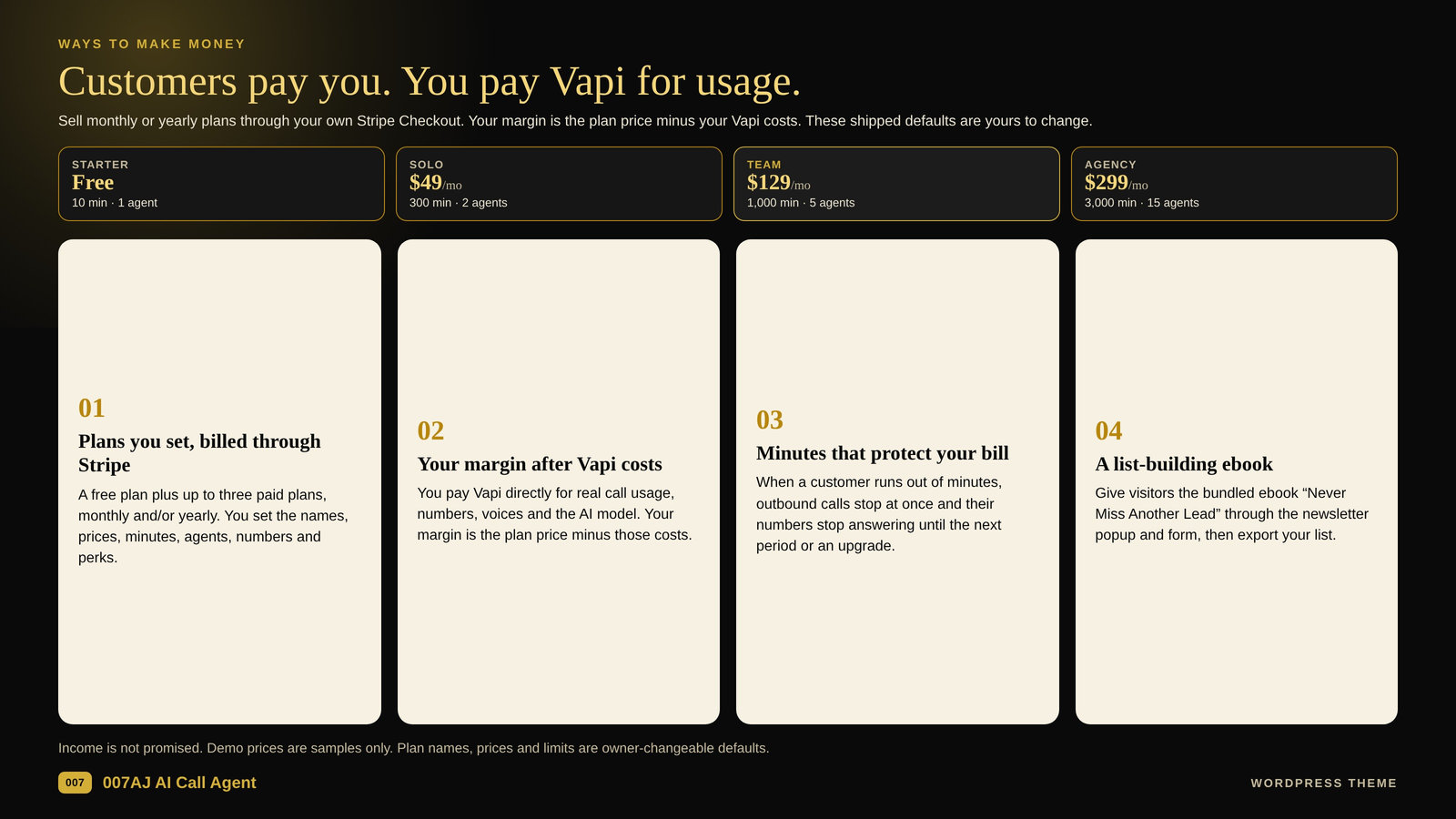
Customers pay you. You pay Vapi for usage. The plan defaults below are yours to change.
1. Plans you set, billed through Stripe
Sell a free plan plus up to three paid plans through your own Stripe Checkout, monthly and/or yearly. You set the names, prices, minutes, agents, numbers and perks, in your own currency. Payments go to you. Shipped defaults, in USD, are yours to change: Starter is free (10 minutes, 1 agent, a call log with transcripts); Solo is $49 a month or $490 a year (300 minutes, 2 agents, 1 number, booking and campaigns); Team is $129 a month or $1,290 a year (1,000 minutes, 5 agents, 3 numbers); Agency is $299 a month (3,000 minutes, 15 agents, 10 numbers).
2. Your margin after Vapi costs
Real calls run through your own Vapi account. You pay Vapi directly for call usage, phone numbers, voices and the AI model. Your margin is the plan price minus those costs. Calls are not free or unlimited.
3. Minutes that protect your bill
Minutes are metered. When a customer runs out, outbound calls stop at once and their numbers stop answering until the next period or an upgrade, which protects your Vapi bill.
4. A list-building ebook
Give visitors the bundled 35-page ebook “Never Miss Another Lead: How AI Phone Agents Answer, Qualify and Book Customers 24/7” through the newsletter popup and form, then export your list as CSV. Optional double opt-in is included.
Income is not promised. Demo prices are samples only. Plan names, prices and limits are owner-changeable defaults. This theme does not bring customers: results depend on your offer and effort.
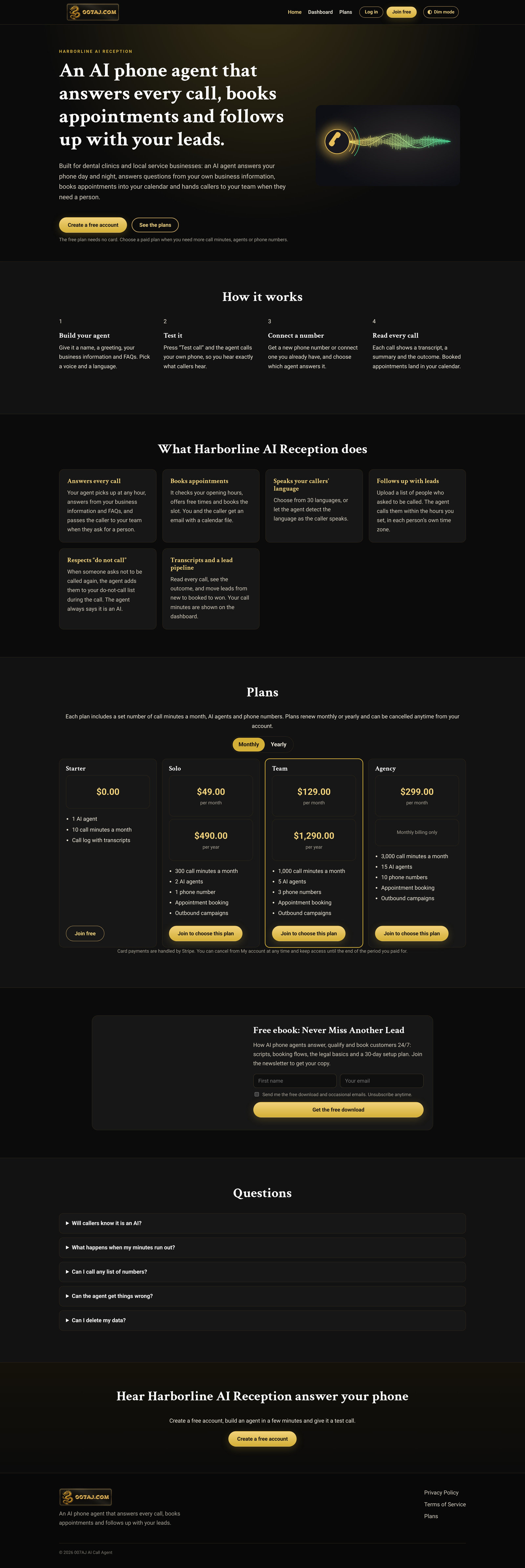
The full home page
Click the screenshot to open the live demo
Open the Live DemoTry a sample account
What you get
Everything below is in the theme and visible in the live demo
The theme
007AJ AI Call Agent for WordPress, version 1.0.1, in the file 007aj-ai-call-agent.zip. Install it from Appearance > Themes > Upload Theme, then set Settings > Permalinks to Post name and save. Open AI Call Agent > Setup checklist and work through each item. This is a normal WordPress theme upload, followed by permalinks and the setup checklist. It requires WordPress 6.4 or later and PHP 7.4 or later (tested up to WordPress 7.1).
Documentation and a setup checklist
Bundled documentation (documentation.html, also under AI Call Agent > Documentation) and a setup checklist that walks through naming the service, connecting Vapi or staying on the Simulator, plans, Stripe, email and a server cron.
Sample content you can remove
A fictional dental clinic and three other fictional businesses ship as sample content, with simulated calls only, so you can click through a finished service. Remove the sample content before you launch. People, businesses and calls in the live demo are made up.
The free ebook
The 35-page lead-magnet ebook “Never Miss Another Lead: How AI Phone Agents Answer, Qualify and Book Customers 24/7” is included as a newsletter download. It covers scripts, booking flows, the legal basics and a 30-day setup plan.
Inside a customer account
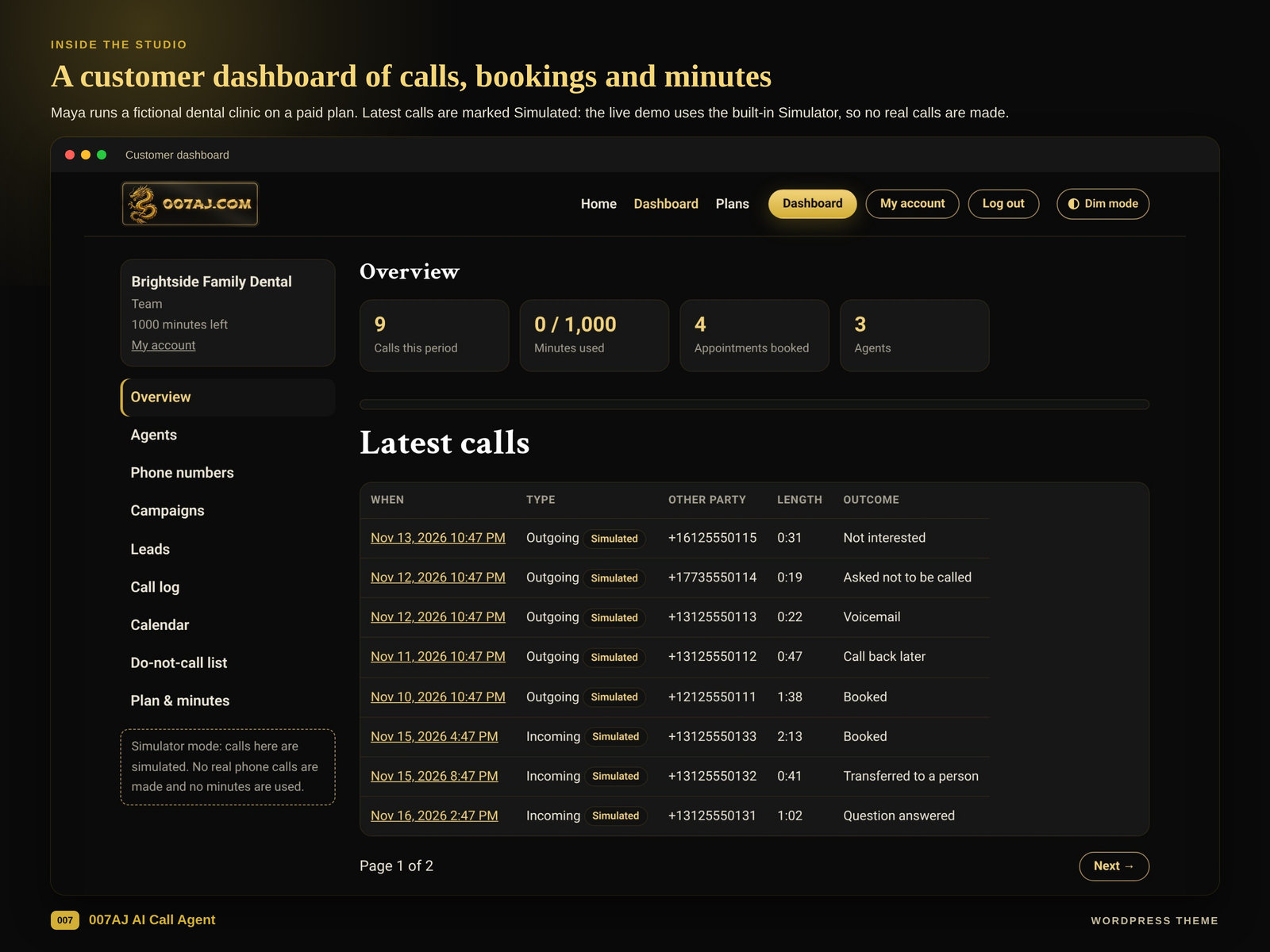
The customer studio, not the admin screens
Build AI agents that answer, qualify and book
Give each agent a name, a greeting, a script, your business information and FAQs, a voice (12 voices), a language, a transfer-to-a-human number and booking rules. Agents can use 30+ languages, including automatic language detection. A Test call button lets the agent call the customer’s own phone. Voice quality and accuracy vary by language; fluency is not guaranteed in every language.
Phone numbers, booking and campaigns
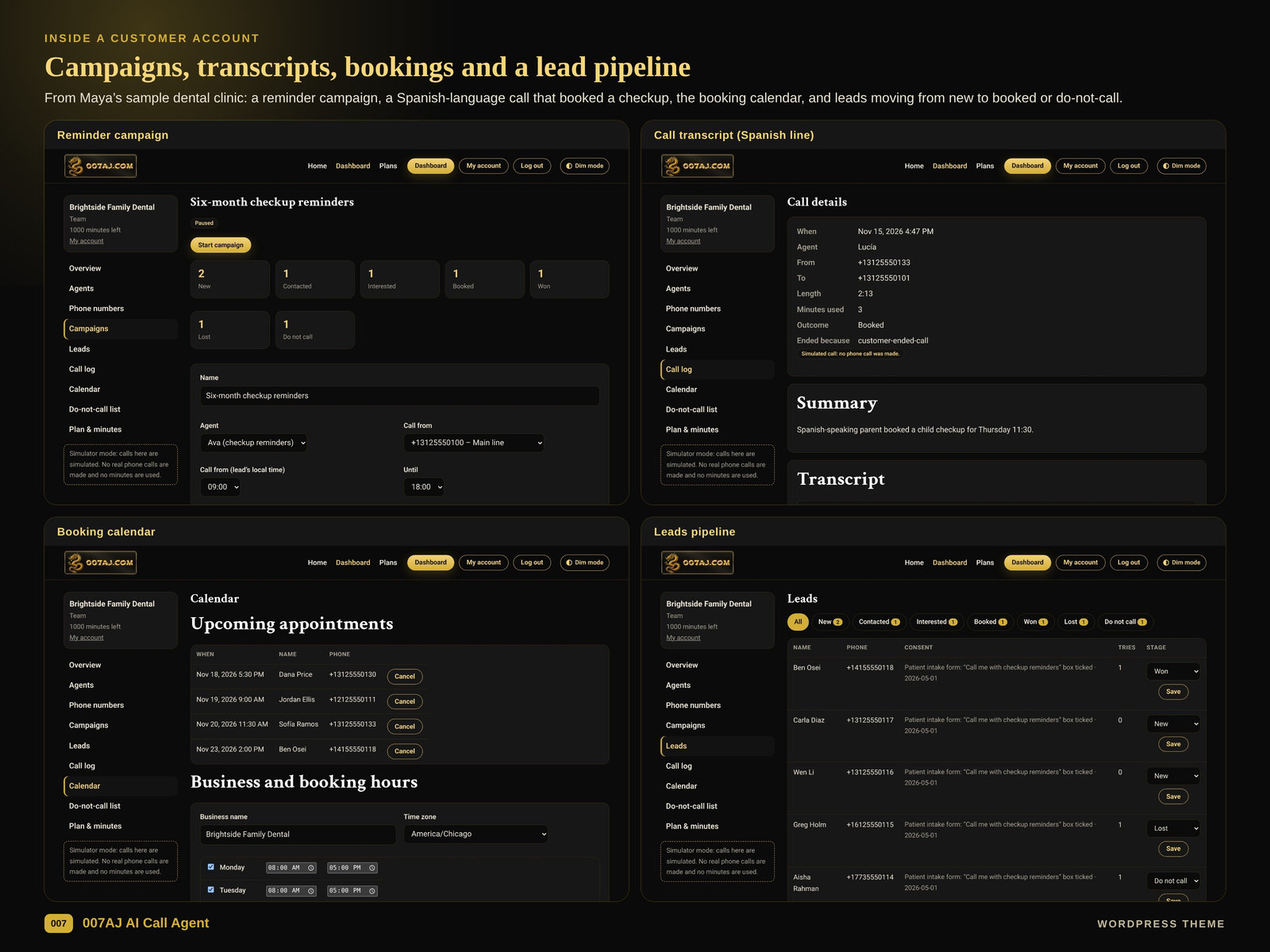
Get a new phone number or connect an existing Twilio number, and pick which agent answers it. Set opening hours, appointment length, buffers and notice: the agent books a free time during the call, and both sides get a confirmation email with a calendar (.ics) file. Run outbound campaigns from a CSV of leads with consent fields, only within calling hours in each lead’s own time zone, with pacing, a limit on calls at once and retries. When someone asks not to be called again, the agent can add them to the do-not-call list during the call.
Every call logged, every lead in a pipeline
Each call shows a transcript, a summary, an outcome, a recording link when recording is allowed, and the minutes used. Leads move through a simple pipeline, from new to booked, won, lost or do-not-call. Customers choose a plan through card checkout and can cancel from My account.
Open the Live DemoTry a sample account

A 35-page ebook that builds your list
Give “Never Miss Another Lead” away through the built-in newsletter popup and form. Optional double opt-in, CSV export and starter Privacy, Terms and Acceptable Use pages are included. The site also has Dark, Dim and Light color modes: you pick the default and can show or hide the visitor toggle. Log in, sign up, forgot password, reset password and My account are branded to your service, so visitors never see the plain WordPress login page.
Plans and payments
Stripe Checkout, with prices you set

Your plans, your prices
A free plan plus up to three paid plans, each with call minutes, a number of AI agents and a number of phone numbers. You set the names, prices, limits and perks. The figures on the live demo and in the graphic above are the shipped defaults, in USD, and you can change them. Customers pay on Stripe Checkout and can cancel from My account.
Stripe’s own page, your own keys
Customers pay on Stripe Checkout, using your own Stripe keys. Money goes to you. Start with test keys first, then switch to live keys after you have verified checkout on a staging site. You pay your own Stripe fees.
What you connect
Your Vapi account, your Stripe keys, your hosting
You connect: your own Vapi account and private API key for real calls (Vapi bills you directly; only Vapi is supported in version 1.0.x); an https site with pretty permalinks so Vapi can reach the webhook; your Stripe keys (test first, then live); and optional SMTP if you want site email to go out through your own mail server. The Vapi key, Stripe secrets and SMTP password can be stored encrypted, or set in wp-config.php. You can keep the built-in Simulator on while you set up, so no real calls are made. A real server cron every minute is strongly recommended so campaigns keep pace. You pay your own Vapi usage fees, Stripe fees and hosting. Payments from your customers go to you.
In the WordPress admin
Safeguards, customers and built-in site tools
Name the service and stay in control
You name the service and who it is for; all wording is owner-set. Approve new customers, pause a customer’s calling, and add bonus minutes. The owner dashboard shows customers, calls and minutes. Privacy exporters and erasers are included.
Calling safeguards (not legal advice)
You can force an AI disclosure line on every agent (on by default), allow or block call recording, set a longest-call limit, a site-wide calling window (8am to 9pm in the lead’s time zone by default), pacing and concurrency caps, a calls-per-customer-per-day limit, a site-wide daily minute cap, blocked words and an emergency stop button. These tools help you set rules. They are not legal advice, and they do not make your service compliant with calling, consent, recording or privacy laws. You are responsible for those laws, including TCPA, CRTC and any others that apply where you and your customers operate.
Built-in site tools
SEO, analytics, SMTP email and backups each have their own on/off switch. SEO covers titles, descriptions, sharing cards, a sitemap and redirects. Analytics is privacy-friendly and uses no cookies. SMTP email includes a test button and a log. Backups include restore and scheduled backups, and they stay on the same server: download important backups yourself. There is no off-site backup built in.
Good to know
What to expect
You bring the customers, and income is not promised
This theme does not bring customers and does not guarantee income. Results depend on your offer and effort. You pay your own Vapi usage fees, Stripe fees and hosting.
Real calls need your own Vapi account
Calling in the product was tested with the built-in Simulator and a simulated Vapi service, not with a live Vapi account. Real calls, real inbound calls, Stripe live payments and real email delivery should be verified by you on a staging site first, after you add your own keys. Only Vapi is supported in version 1.0.x.
You are responsible for the law
You are responsible for calling, consent, recording and privacy laws that apply to you and your customers. The theme provides safeguards, but that is not legal advice.
No mobile app, and backups stay on the same server
This is a responsive website, not a mobile app. Backups stay on the same server. There is no cloud or off-site backup built in.
Demo mode is only for a demo site
The sales page at the site root and the sample logins on /try/ exist only on the demo build. The buyer zip ships with demo mode off and a product homepage, not the sales page. Demo mode belongs on a separate demo site, never on a live service. Calls on the live demo are marked Simulated: no real phone calls are made.
A server cron every minute is strongly recommended
A real server cron every minute is strongly recommended so outbound campaigns keep pace and scheduled work runs on time.
Hosting and setup
To run this theme, you’ll need a domain name (or a subdomain) and web hosting. You’re free to use any hosting provider you like. This theme installs as a normal WordPress theme upload from Appearance > Themes > Upload Theme. Set permalinks to Post name, then open AI Call Agent > Setup checklist and work through each item: naming the service, connecting Vapi or staying on the Simulator, plans, Stripe, email, and a server cron. The site must be served over https so Vapi can reach the webhook. Test Stripe with test keys, and verify real calls on a staging site, before you switch to live keys. Remove the sample content before launch. If you’d rather keep it simple, you can stay with our hosting for $5/month.
Questions
Is there anything else I need to install or buy?
The theme zip, the documentation, the setup checklist, removable sample content, and the lead-magnet ebook “Never Miss Another Lead” are all part of the theme. You bring a domain name, web hosting (see Hosting and setup), your own Vapi account and API key for real calls, your own Stripe keys, and optional SMTP. The dashboard, campaigns, booking, payments, newsletter, SEO, analytics, SMTP email and backups are built in. You pay Vapi’s usage fees separately. Only Vapi is supported in version 1.0.x.
Do I need my own payment and calling accounts?
Yes. Real calls need your own Vapi account and private API key, and Vapi bills you directly for usage. You also connect your Stripe keys (test keys first). Secrets can be stored encrypted, or set in wp-config.php. Payments from your customers go to you through Stripe Checkout. You pay your own Vapi, Stripe and hosting costs. Verify real calls, inbound numbers, live Stripe payments and email on a staging site after you add your own keys.
Can I try it first?
Yes. Open the live demo to see the public site, or use the sample logins on the try page: Maya runs the fictional Brightside Family Dental on a paid plan, with a front-desk agent, a Spanish line, a reminder campaign, call transcripts, booked appointments and a lead pipeline; Priya is on the top plan; Sam is a brand-new free account and shows the upgrade path; Leo is a fictional realty office; and Dana is a staff/manager view of the owner dashboard (sample data only). All people, businesses and calls in the demo are made up. The live demo uses the built-in Simulator, so no real phone calls are made.
Do I need coding skills?
No. Install it as a normal WordPress theme upload from Appearance > Themes > Upload Theme, set permalinks to Post name, and follow the setup checklist. Documentation is included as documentation.html, and is also available under AI Call Agent > Documentation. A server cron every minute is strongly recommended so campaigns keep pace. The theme requires WordPress 6.4 or later and PHP 7.4 or later.
Where do I get help?
Our in-house team built this theme and supports it directly through 007aj.com after your purchase.
Open the Live DemoTry a sample account
Start your own 24/7 AI phone agent service
Sell plans through Stripe, let local businesses answer every call, and keep the margin after your Vapi costs. Open the live demo, then try Maya’s sample account to click through agents, campaigns, transcripts, bookings and leads.
Support: contact us through 007aj.com · Built and supported in-house by our team
Not affiliated with Vapi, Stripe, WordPress or Twilio.