
Run Your Own AI Social Post Scheduling Service, Billed Through Stripe
007AJ Social Post Scheduler is a WordPress theme that turns your site into your own AI-assisted social post scheduling service, paid with credits. Members write captions from a topic, link or product, plan them on a content calendar, and publish to Facebook Pages, X, LinkedIn and Pinterest with their own access tokens, or copy and post by hand. You sell monthly plans and credit packs through Stripe Checkout, at prices you set, and you set the credit cost of each action. Every new member receives free starter credits once at signup, in an amount you set.
Open the Live DemoTry the studio
Ways to make money
Monthly plans, credit packs, starter credits and a list-building ebook
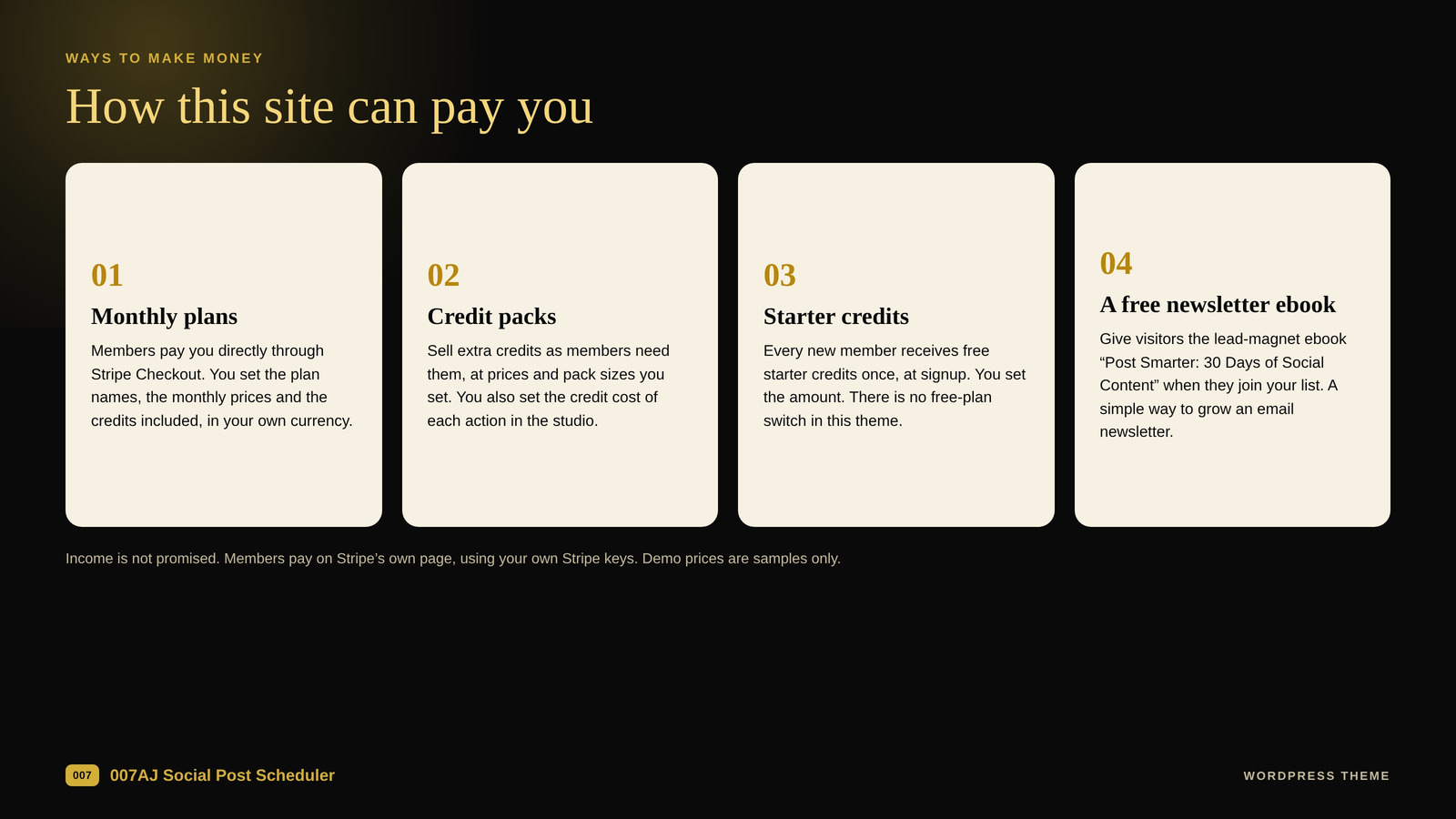
1. Monthly plans
Members pay you directly through Stripe Checkout. You set the plan names, the monthly prices and the credits included, in your own currency. Payments go to you.
2. Credit packs
Sell extra credits as members need them, at prices and pack sizes you set. You also set the credit cost of each action in the studio.
3. Starter credits
Every new member receives free starter credits once, at signup. You set the amount (20 in the shipped default). There is no free-plan switch in this theme.
4. A free newsletter ebook
The theme includes the lead-magnet ebook “Post Smarter: 30 Days of Social Content” as a protected newsletter download. Visitors give you their email address to get the guide — a simple way to build a list you can sell to later.
Income is not promised. Members pay on Stripe’s own page, using your own Stripe keys. Prices on the live demo are samples only. This theme does not include ad revenue, transaction fees or affiliate income.
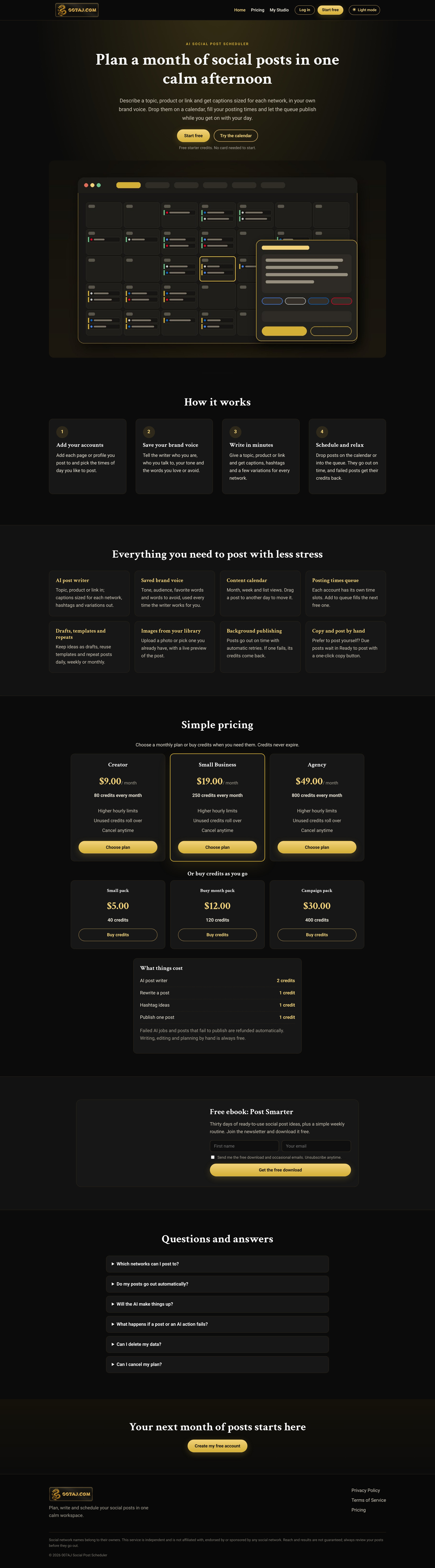
The full home page
Click the screenshot to open the live demo
Open the Live DemoTry the studio
What you get
Everything below is in the theme and visible in the live demo
The theme
007AJ Social Post Scheduler for WordPress, version 1.0.1. Install it from Appearance > Themes > Upload Theme. Members get a studio to write, schedule and publish social posts, and you bill monthly plans and credit packs through Stripe Checkout.
Documentation
Bundled documentation (documentation.html), also available in wp-admin under Social Post Scheduler > Documentation.
A setup checklist
A setup checklist walks you through the first steps after you upload the theme.
A free lead-magnet ebook
“Post Smarter: 30 Days of Social Content” is included as the protected newsletter download, so visitors can join your list to get the guide.
Inside the member studio
What your members use to plan and publish a month of posts
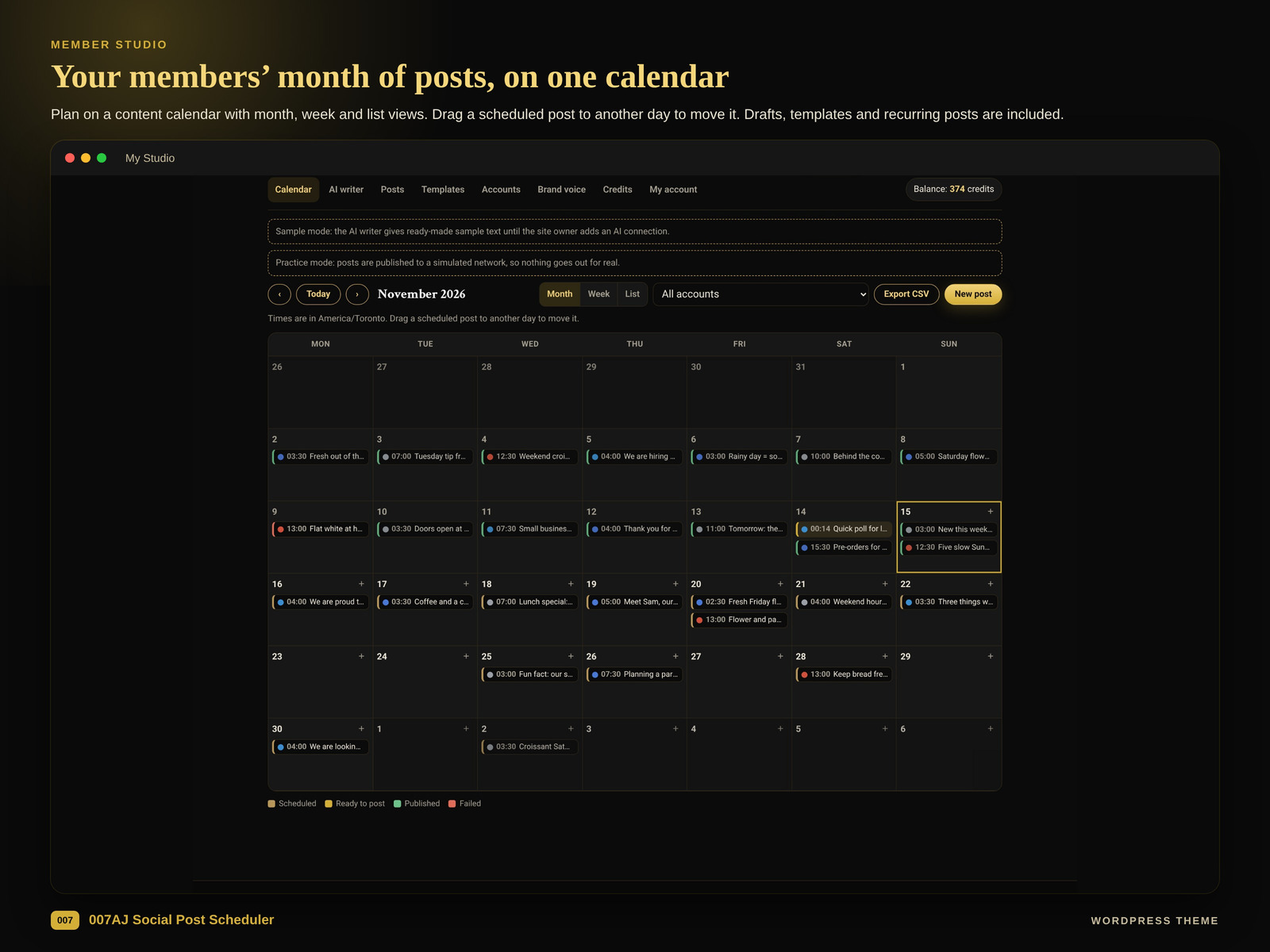
My Studio. Members plan on a content calendar with month, week and list views, drag a scheduled post to another day to move it, keep drafts, reuse templates, set recurring posts, and keep track of their credit balance and history. Pricing and signup pages are part of the theme as well.
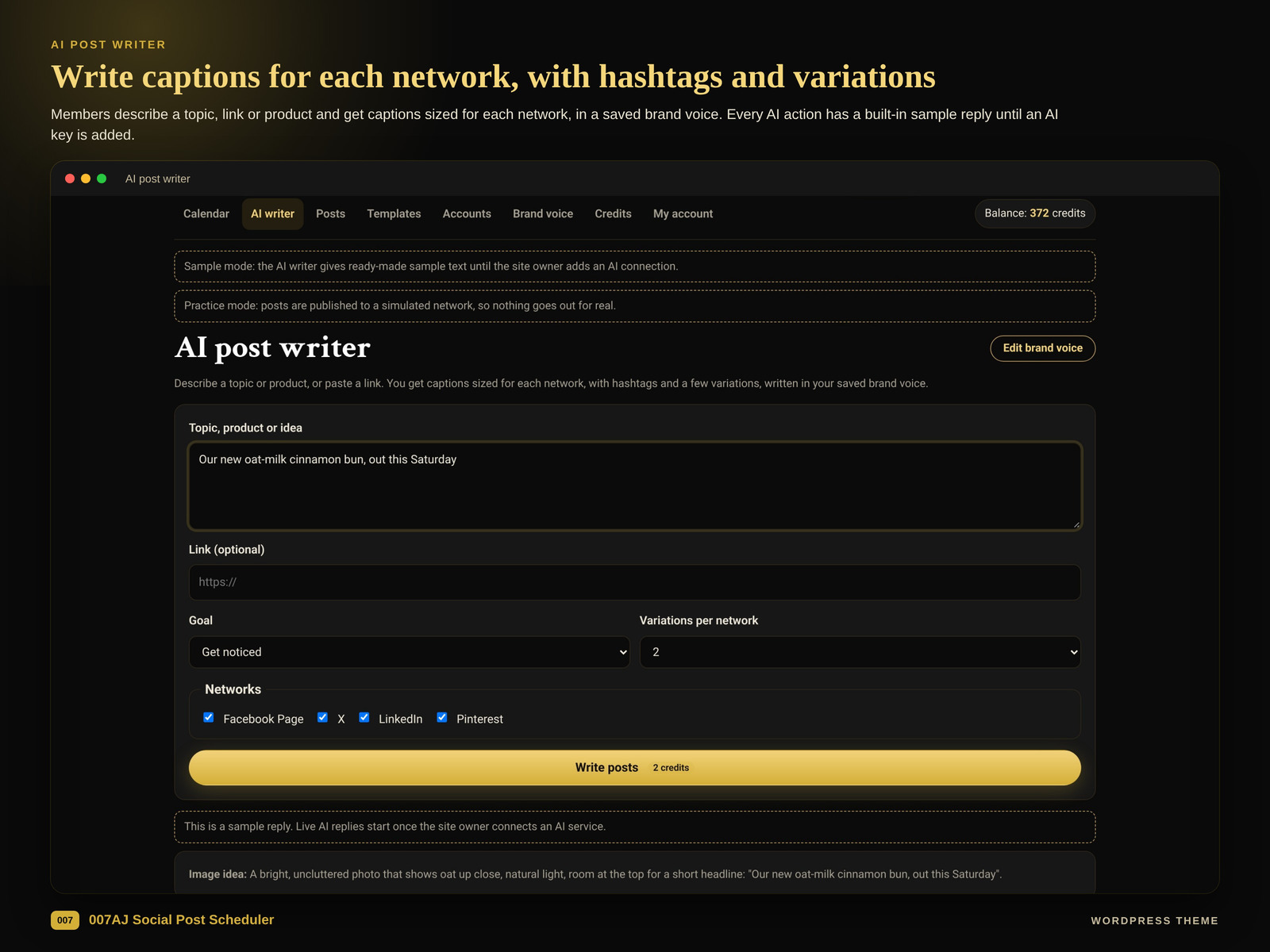
AI post writer. Members describe a topic, link or product and get one caption per network, hashtags and up to three variations, written in a saved brand voice. They can also rewrite a post and get hashtag ideas. Members should review AI captions before they go out.
Open the Live DemoTry the studio
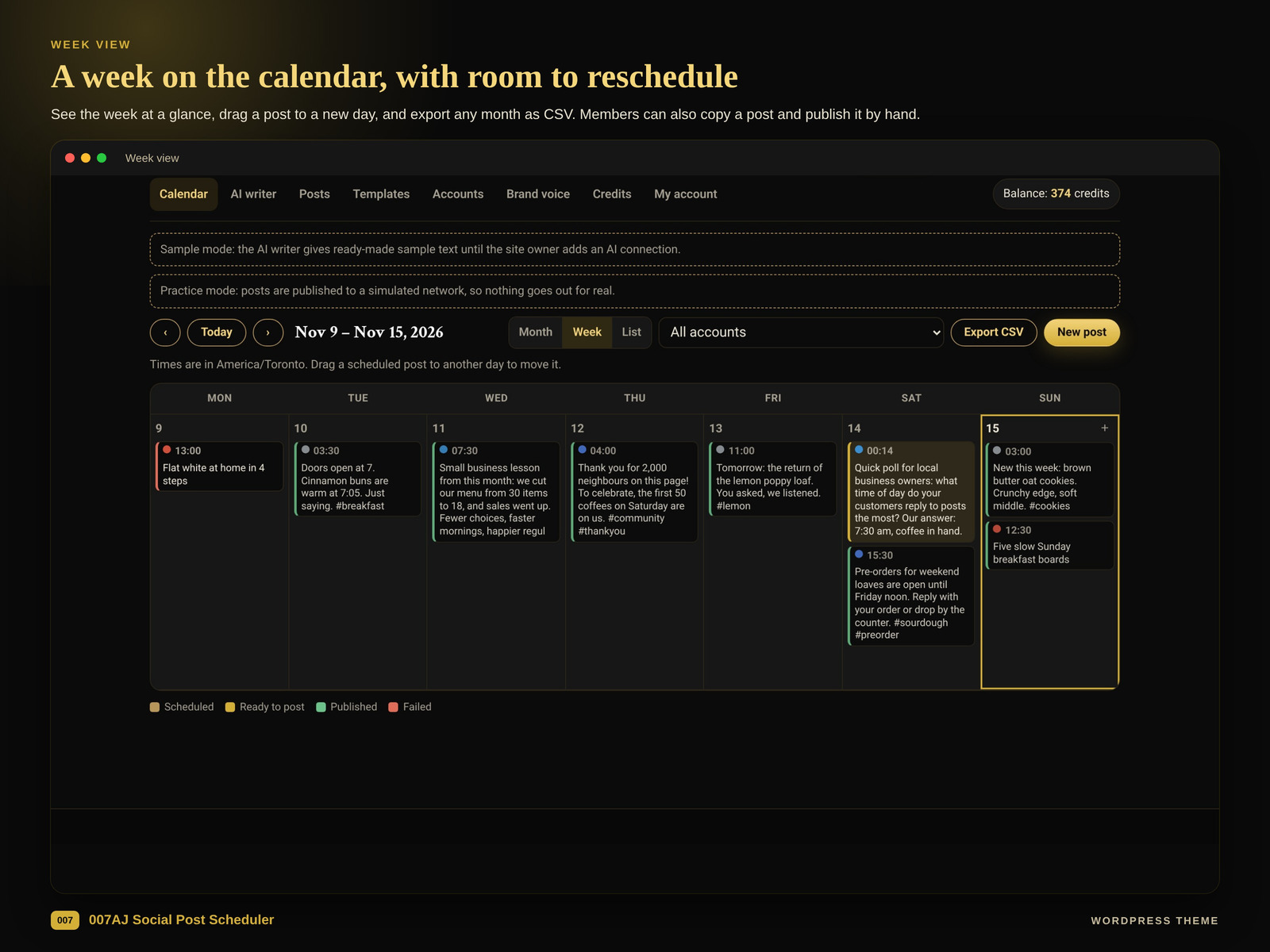
Week view and queue. Members can switch to a week or list view, give each social account its own weekly posting times, and add posts to the queue. They can attach images from their own uploads or media library, export any month as CSV, and copy a due post to publish it by hand.
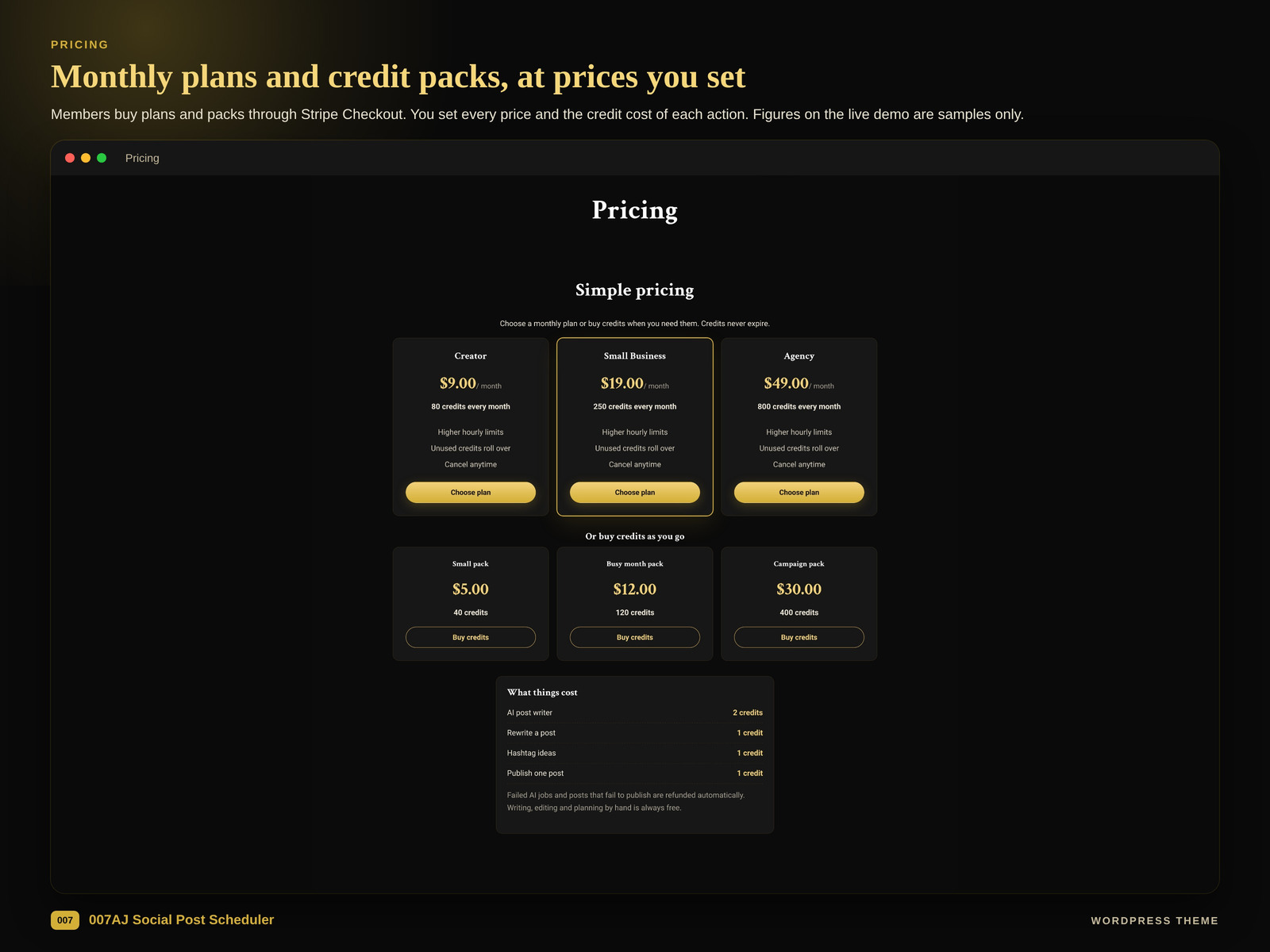
Plans members can buy. The pricing page shows monthly plans and credit packs. You set every price and the credit cost of each action. Figures on the live demo are samples only.
Publishing. Members can publish to Facebook Pages, X, LinkedIn and Pinterest with their own access tokens, or copy and post by hand. Live publishing needs developer access and member tokens. Manual mode needs no tokens.
Privacy and data. Members have a delete-all-my-data button.
Light mode and Dark mode. A Light / Dark toggle sits in the top corner of every front-end page. Dark mode is the default, and you can switch the whole site, the editor and emails with one button in the admin. The visitor toggle can be hidden.
Built-in newsletter. A popup, an inline form and a block are included, so you can offer the free ebook and collect email addresses.
Plans and payments
Stripe Checkout, with prices you set
Monthly plans and credit packs
You sell monthly plans and credit packs through Stripe Checkout, at the prices you set. You also set the credits included, pack sizes and the credit cost of each action. Checkout stays off until you enable it and add Stripe keys.
Stripe’s own page
Members pay on Stripe Checkout, using your own Stripe keys. Money goes to you. Start with test keys first. An optional Stripe webhook can confirm renewals; without one, a daily check confirms subscriptions. The theme never creates or deletes webhooks.
Usage, caps and refunds
A usage and AI cost dashboard, a monthly AI spend cap, a site-wide daily AI-call cap, per-member hourly limits, and automatic refunds when an AI job or a publish fails after retries.
Demo prices are samples
You set every price yourself. Figures on the live demo are examples only, not a promise of income.
What you connect
Your keys, your payments, your studio
You connect: a text AI key (Claude / Anthropic is the default, or any OpenAI-compatible endpoint), your Stripe keys, and optional SMTP. Live AI stays off until you turn it on and add a key. Every AI action has a built-in sample reply, so the studio works without an AI account. For live publishing only, members paste their own network tokens. Manual mode needs no tokens. Simulated mode is for demos and sends nothing to any network. Keys, SMTP passwords and member tokens are encrypted before they are saved and are never shown again. Constants in wp-config.php always win. You pay your own AI and Stripe fees. Payments go to you.
In the WordPress admin
Setup, usage and your subscriber list
A setup checklist, Settings, Members & Credits, a usage and AI cost dashboard, Subscribers, and Documentation. A Studio manager role can use the operational screens without full site-admin access. You get manual, live and simulated publishing modes, an on/off switch for each network, background publishing with retries and automatic credit refunds when a post fails, optional email to the member after the last failed attempt, plans and credit packs, a newsletter (popup, inline form, block, subscriber list, CSV export and optional double opt-in) with the protected ebook download, built-in SMTP, privacy export and erase tools, starter Privacy and Terms pages (created only if they do not already exist), and a one-button light/dark switch for the whole site, the editor and emails (dark by default; the visitor toggle can be hidden).
Open the Live DemoTry the studio
Good to know
What to expect
You bring your own accounts
You need your own AI, Stripe and email accounts, and you pay your own AI and Stripe fees.
A server cron is needed
A real server cron is needed for posts to go out on time. WordPress’s visit-based cron is not enough for exact posting times; a one-minute server cron that calls wp-cron.php is recommended. The theme does not promise that scheduled posts will always publish at the exact minute without a server cron.
Review AI captions before they go out
The theme does not promise that AI captions need no review. Members should review posts before they go out.
Live publishing needs member tokens
Live publishing needs developer access and the member’s own network tokens. In manual mode, members copy due posts and post them by hand. Simulated mode is for demos and sends nothing to any network.
The demo uses sample replies
The live demo uses built-in sample AI replies, simulated publishing and Stripe test mode, so nothing is charged and nothing is sent to any network.
Demo mode is only for a demo site
The sales page at the site root and the sample logins on /try/ exist only on the demo build. The buyer zip ships with demo mode off and a product homepage, not the sales page. Demo mode should only be used on a separate demo site, never on a live store.
Not affiliated with the networks
The theme is not affiliated with Facebook, X, LinkedIn or Pinterest. Those names are trademarks of their owners. The theme uses each network’s public API with tokens the members provide. The theme does not include ad revenue, transaction fees or affiliate income.
Hosting and setup
To run this theme, you’ll need a domain name (or a subdomain) and web hosting. You’re free to use any hosting provider you like. This theme installs as a normal WordPress theme upload from Appearance > Themes > Upload Theme. Set permalinks to Post name, then follow the setup checklist, and set up a real server cron so posts go out on time. If you’d rather keep it simple, you can stay with our hosting for $5/month.
Questions
Is there anything else I need to install or buy?
The theme zip, the documentation, the setup checklist, starter Privacy and Terms pages, and the lead-magnet ebook “Post Smarter: 30 Days of Social Content” are all part of the theme. You bring a domain name, web hosting (see Hosting and setup), your own Stripe keys, a text AI key (Claude / Anthropic, or any OpenAI-compatible endpoint), and optional SMTP. The studio works with built-in sample replies before an AI account is added. For live publishing, members provide their own network tokens; manual mode needs no tokens.
Do I need my own payment and AI keys?
Yes. You connect a text AI key, Stripe keys and optional SMTP. Keys are encrypted before they are saved, or can be set in wp-config.php. Payments go to you through Stripe Checkout, and you pay your own AI and Stripe fees.
Can I try it first?
Yes. Open the live demo to see the public site, or try the studio with the sample logins: Maya is a social media manager with a full month on the calendar, Leo is a new member, and Nadia is an agency owner and studio manager. The demo uses sample replies, simulated publishing and Stripe test mode, so nothing is charged and nothing is sent to any network.
Do I need coding skills?
No. Install it as a normal WordPress theme upload from Appearance > Themes > Upload Theme, set permalinks to Post name, and follow the setup checklist. Documentation is included as documentation.html, and is also available under Social Post Scheduler > Documentation. A real server cron is needed for posts to go out on time.
Where do I get help?
Our in-house team built this theme and supports it directly through 007aj.com after your purchase.
Open the Live DemoTry the studio
Start your own AI social post studio
Sell monthly plans and credit packs through Stripe, offer a free ebook that builds your email list, and let members write captions, plan a calendar and publish from one WordPress theme. Open the live demo and click through every view.
Support: contact us through 007aj.com · Built and supported in-house by our team
Not affiliated with OpenAI, Anthropic, Stripe, WordPress, Facebook, X, LinkedIn or Pinterest.