

Rankwise SEO Suite
Titles, Schema, Sitemaps, Redirects and Site Audits
Give your WordPress site the on-page basics search engines and social networks read — titles, descriptions, structured data, sitemaps, breadcrumbs and redirects — plus Suite tools for larger content sites: five focus keywords, extra schema types, a 404 log, pattern redirects, image SEO, local SEO, audits and more. Everything runs on your own site.
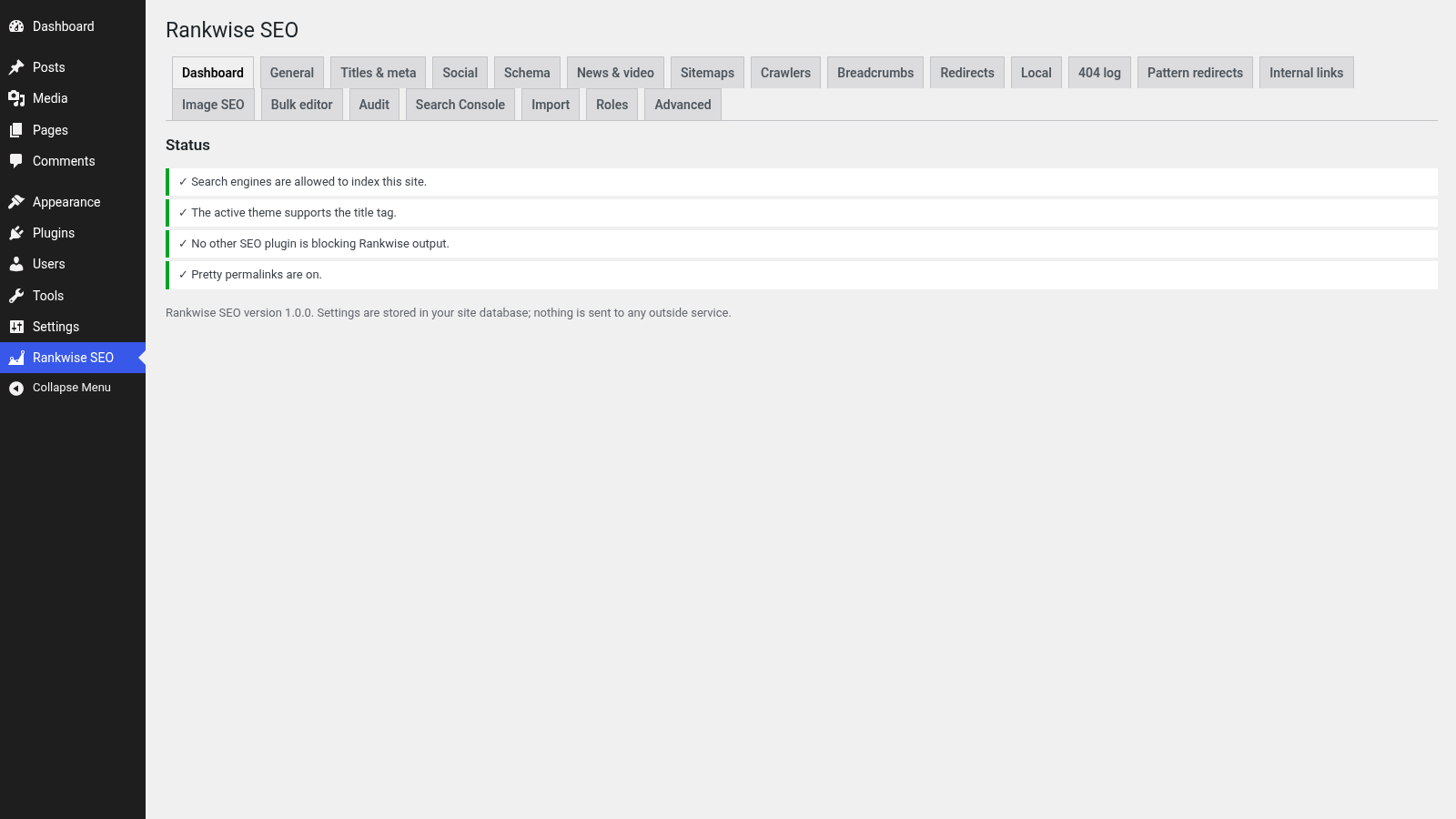
A clear dashboard for the whole Suite
Status checks and every settings tab in one Rankwise SEO screen.
On-page SEO that stays on your site
Titles, social cards, structured data, sitemaps, breadcrumbs, redirects and an importer — the shared Rankwise toolkit, included in Suite.
Titles and descriptions
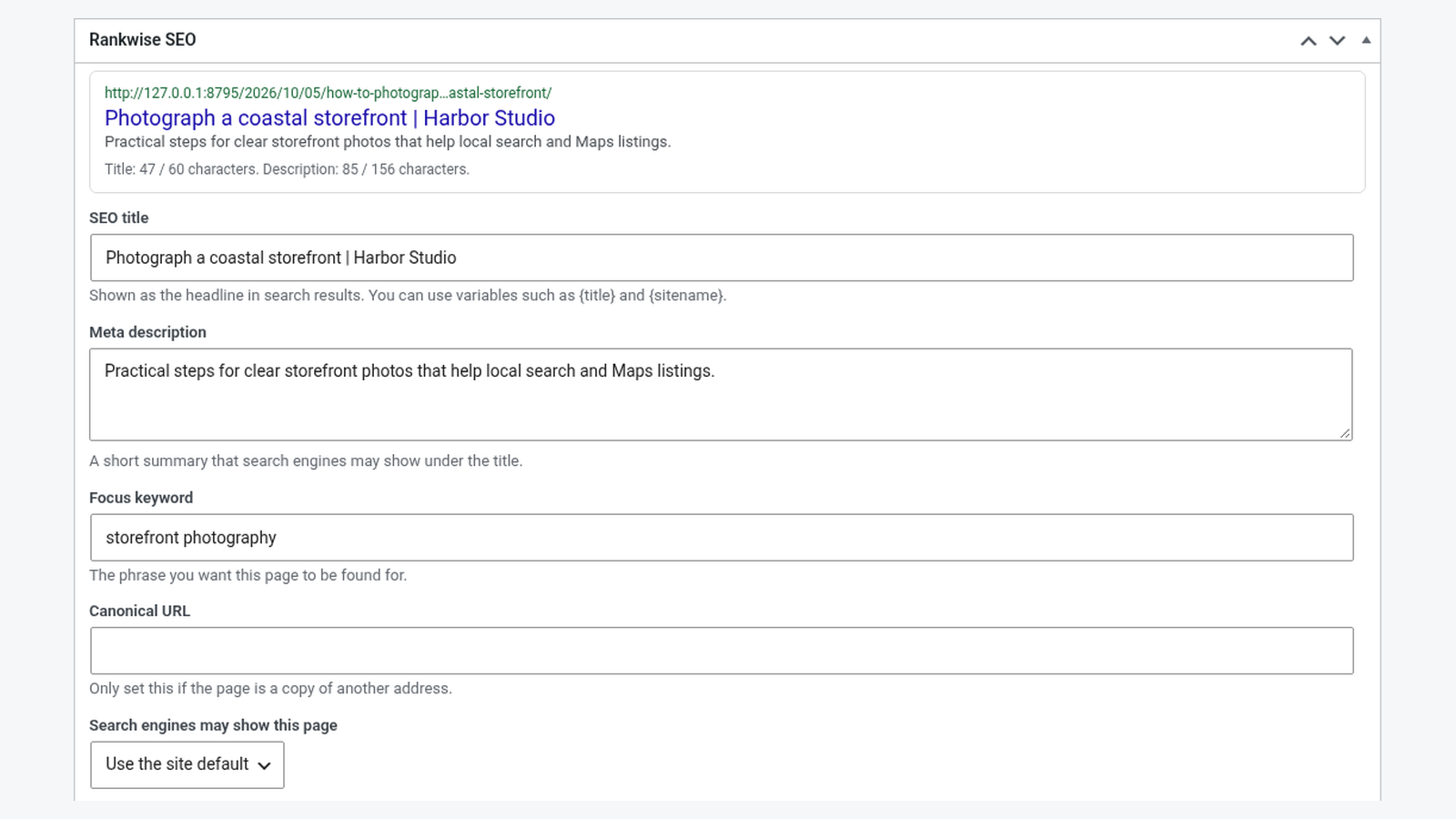
Templates with variables for every kind of page, plus a Rankwise SEO box on posts and pages (and fields on terms, optional on author profiles). SERP and social previews sit next to the fields while you write.
Open Graph and Twitter cards
Social title, description and image tags for sharing. Default image and Twitter card type are set once for the site.
JSON-LD structured data
Organisation or person, website, page, article and breadcrumb nodes. Suite also adds FAQ, how-to, product, local business, recipe, event and video — only when the required fields are filled in.
Sitemaps, robots.txt and llms.txt
Settings for the XML sitemap built into WordPress. A robots.txt editor with a safety check, optional AI crawler rules, and an optional /llms.txt file.
Breadcrumbs
A block, the shortcode, or a template function. Separator and home label are yours to set.
Redirects with CSV
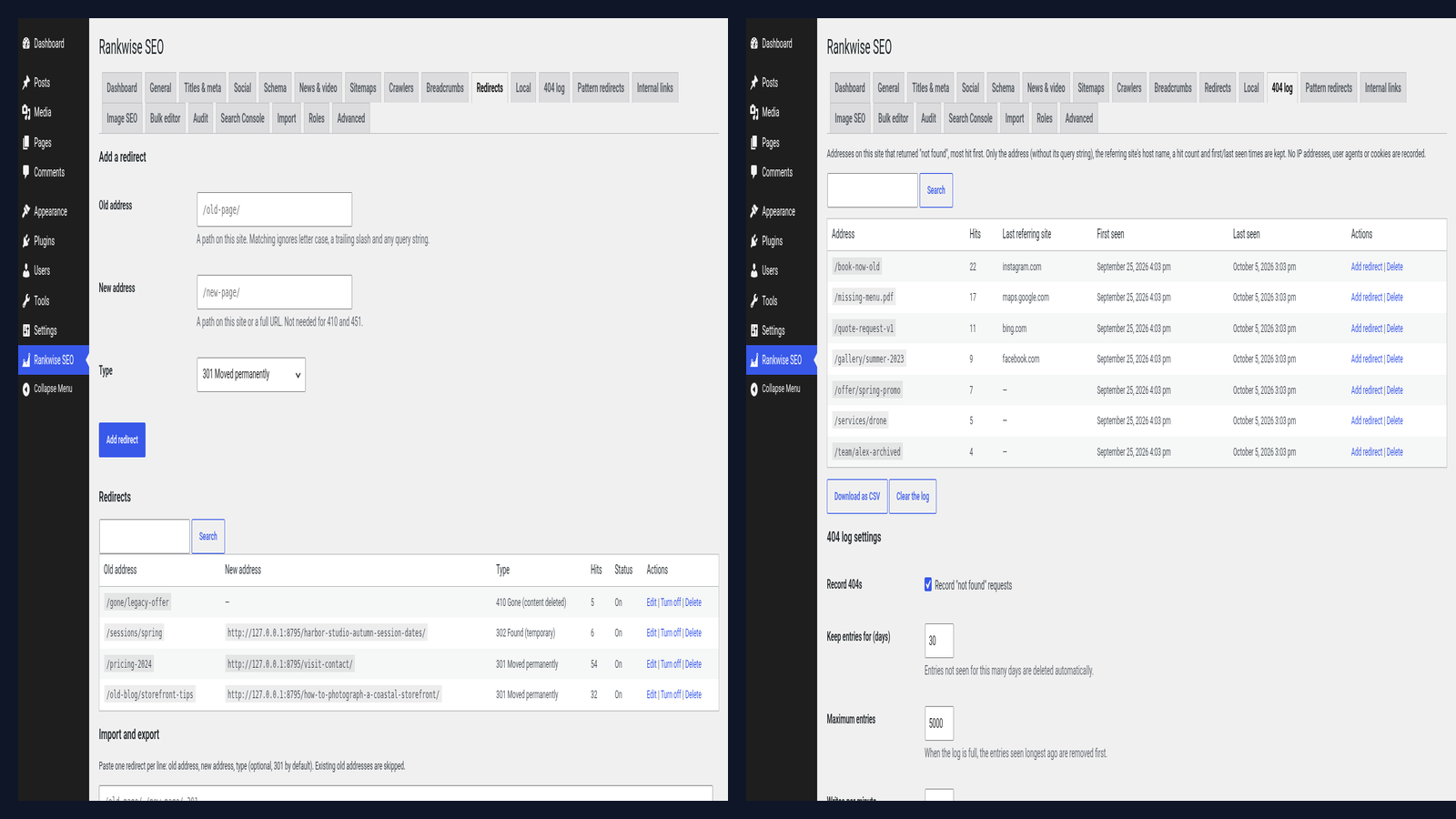
301, 302, 307, 410 and 451 redirects with loop detection, CSV import and export, and an offer to add a redirect when you change a published post address.
Importer from prior SEO plugins
Bring titles, descriptions and other SEO fields across with a preview and an undo button.
Canonical, robots and verification
Per-page canonical links, noindex / nofollow controls and site verification tags for Google, Bing and others.
The Rankwise SEO box while you write
Search title, meta description, focus keyword, robots and social fields, with SERP preview, readability and keyword checks.
Suite extras for larger content sites
Five focus keywords, richer schema, 404 logging, pattern redirects, image and local SEO, audits, bulk edits and more.
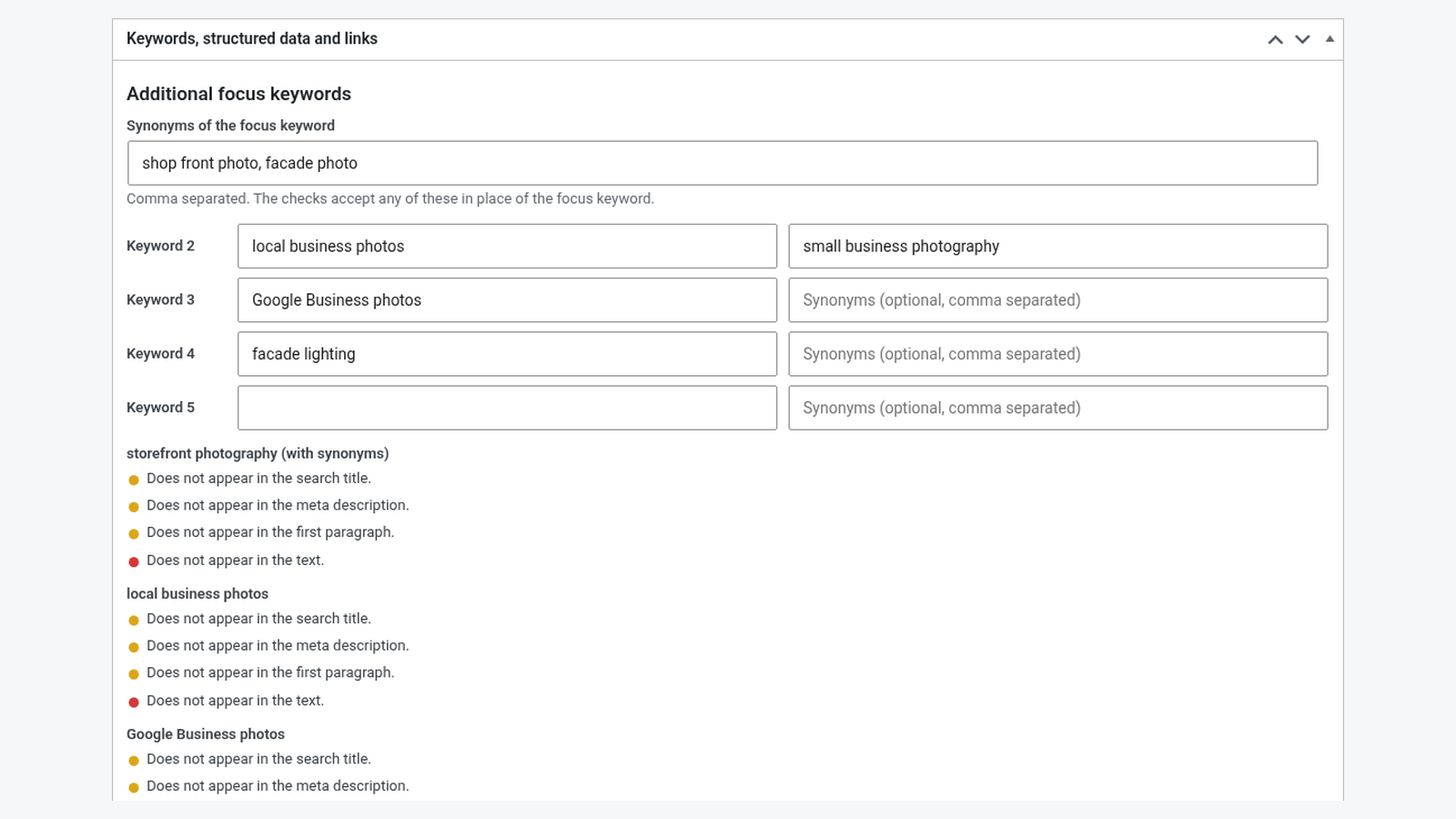
Five focus keywords with synonyms
The main focus keyword plus up to four more, each with optional synonyms, checked while you write.
Extra schema types
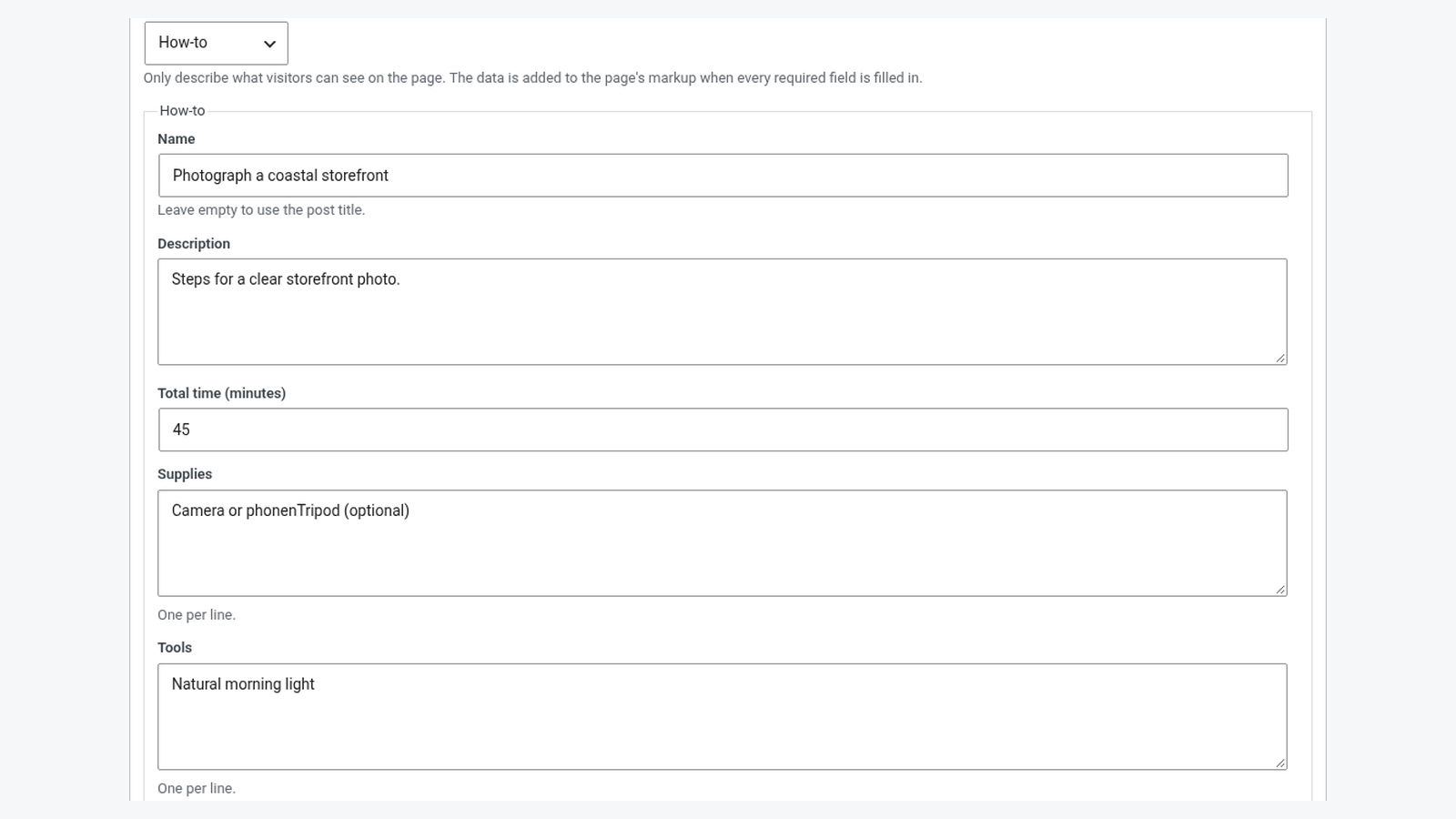
FAQ, how-to, product, local business, recipe, event and video. Missing required fields are listed in the editor; nothing is printed until they are filled.
404 log (no IP or user agent)
Addresses that returned not found, with hit counts and the referring host. CSV download and a one-click link to add a redirect. Entries prune automatically.
Pattern redirects
Regular-expression redirects with a tester, safety checks against slow patterns, CSV import and export, and bulk changes to exact redirects.
Internal link suggestions
Related posts from your own site that the text does not link to yet, from an index kept in your database. Nothing is sent outside.
Image SEO
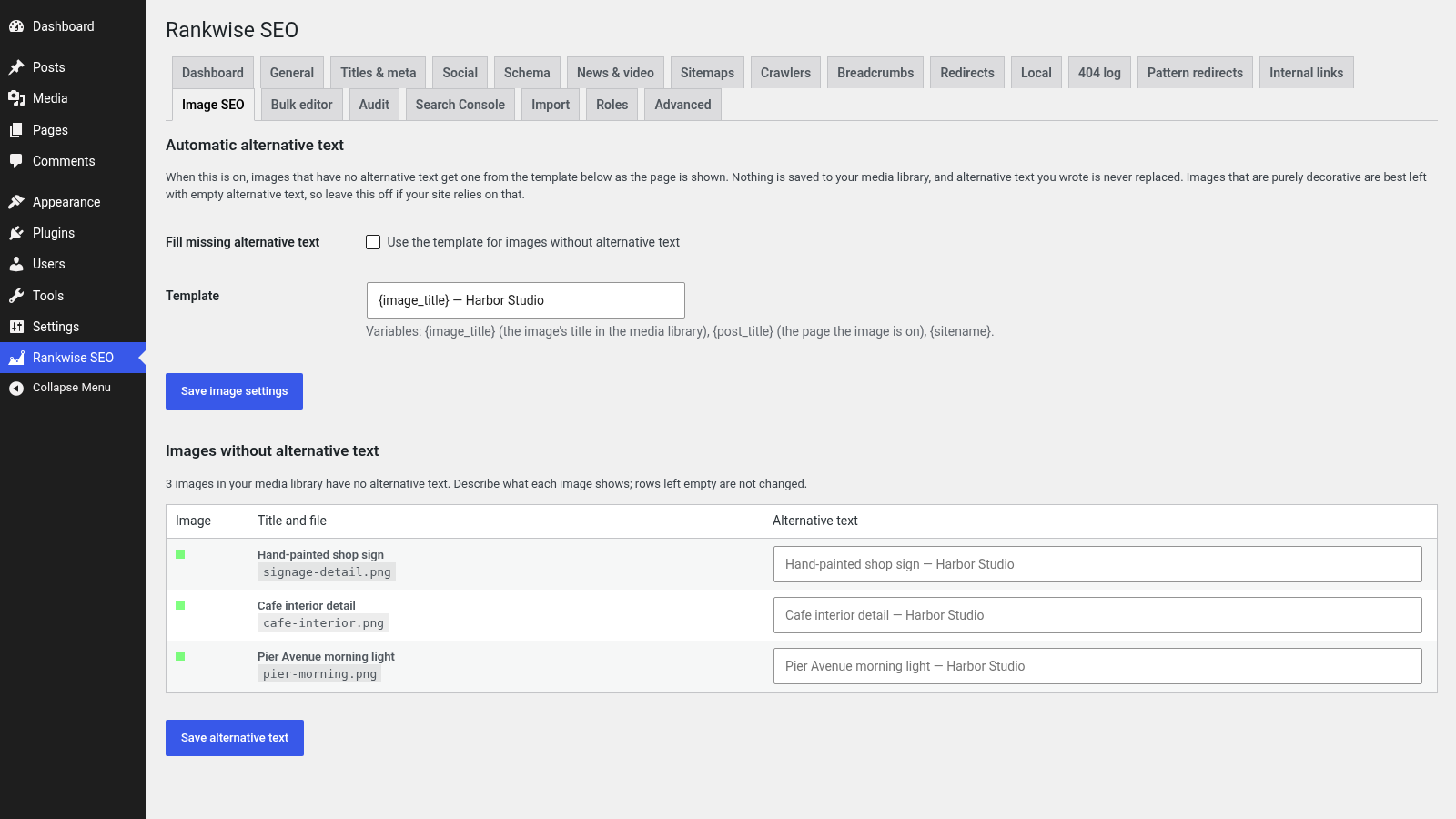
A list of media library images without alternative text, plus an optional template that fills empty alt text when a page is shown (without changing the media library).
Local SEO
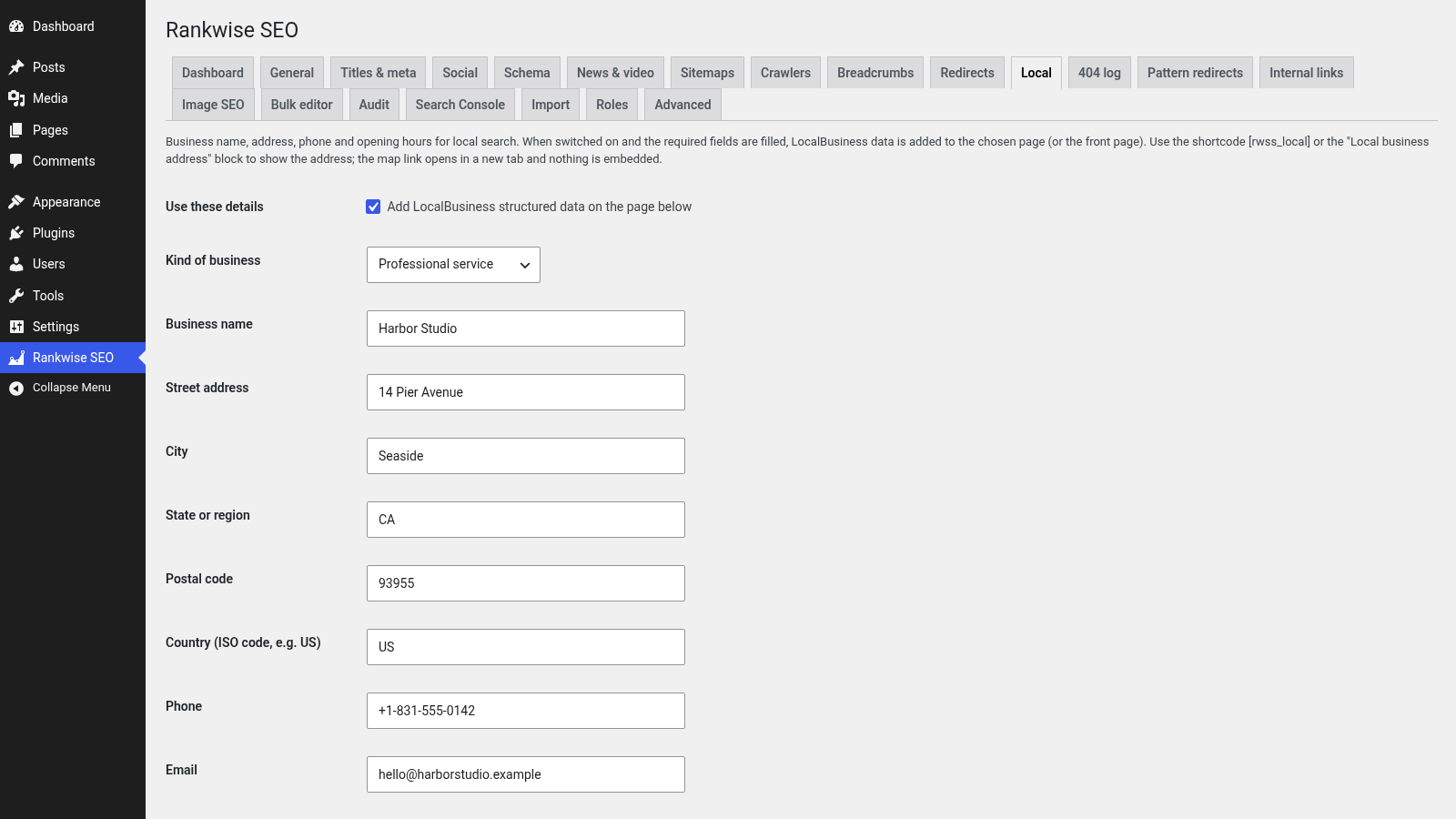
Business name, address, phone and opening hours, LocalBusiness structured data on a chosen page, and an address shortcode/block with a map link (nothing is embedded).
News and video sitemaps
Built on WordPress sitemap engine when you switch them on.
Google Search Console (optional)
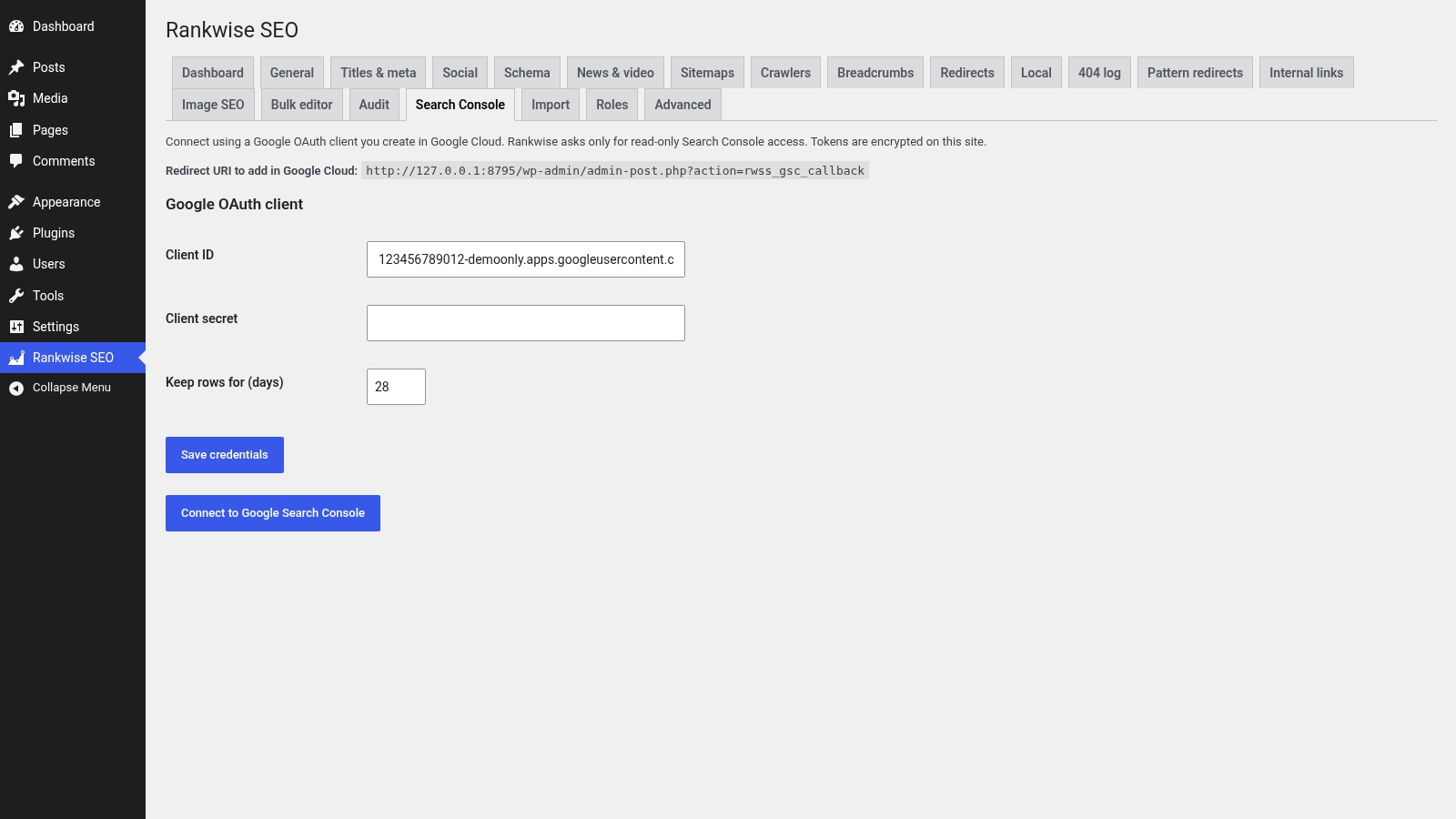
Your own Google OAuth client, read-only scope, encrypted tokens and cached clicks / impressions / queries. Off by default; no connection was made in the demo screenshots.
SEO audit and Site Health
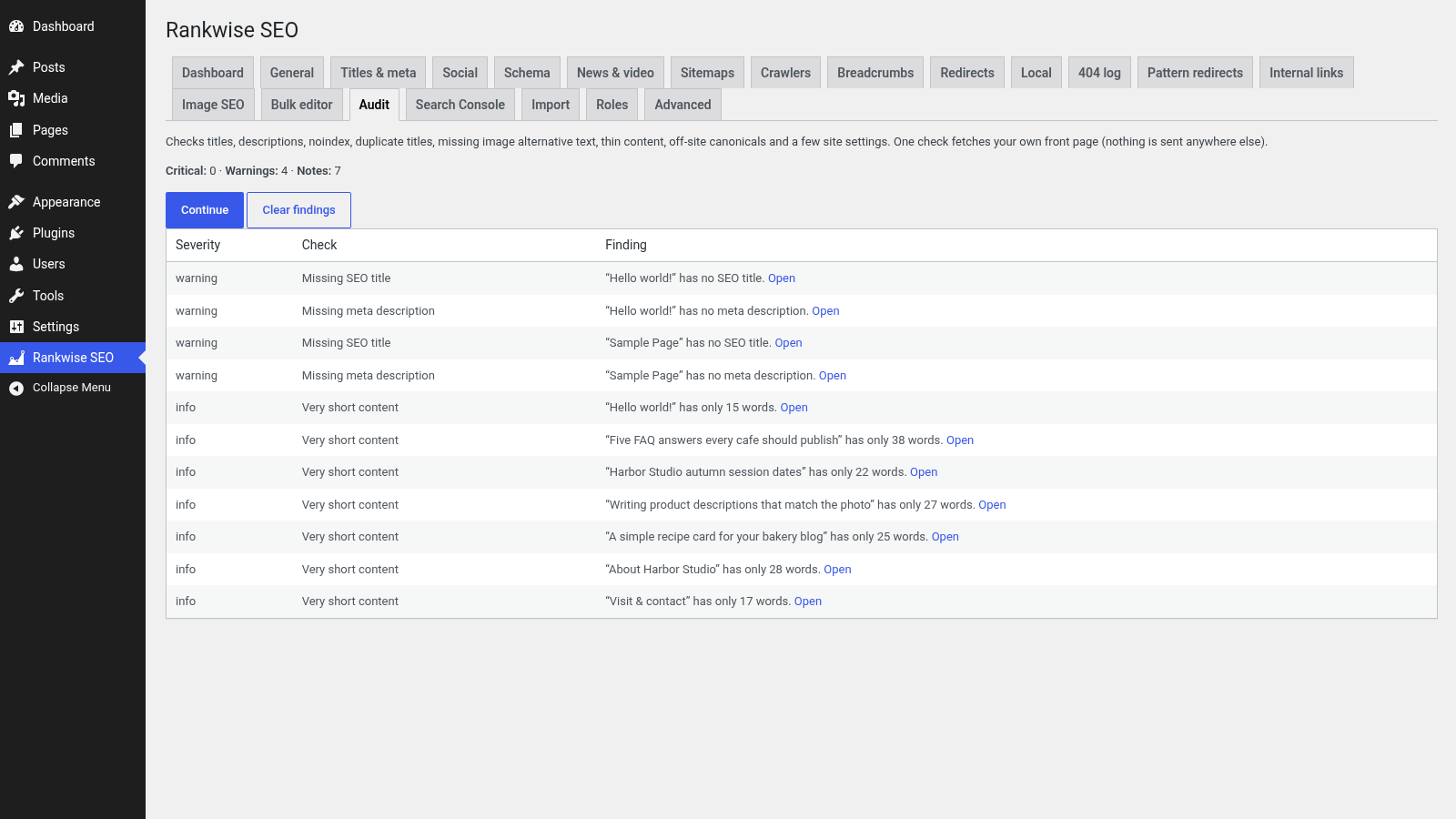
Titles, descriptions, noindex, duplicates and a few site checks, plus a Site Health test for critical findings. One check fetches only your own front page.
Bulk editor and role manager
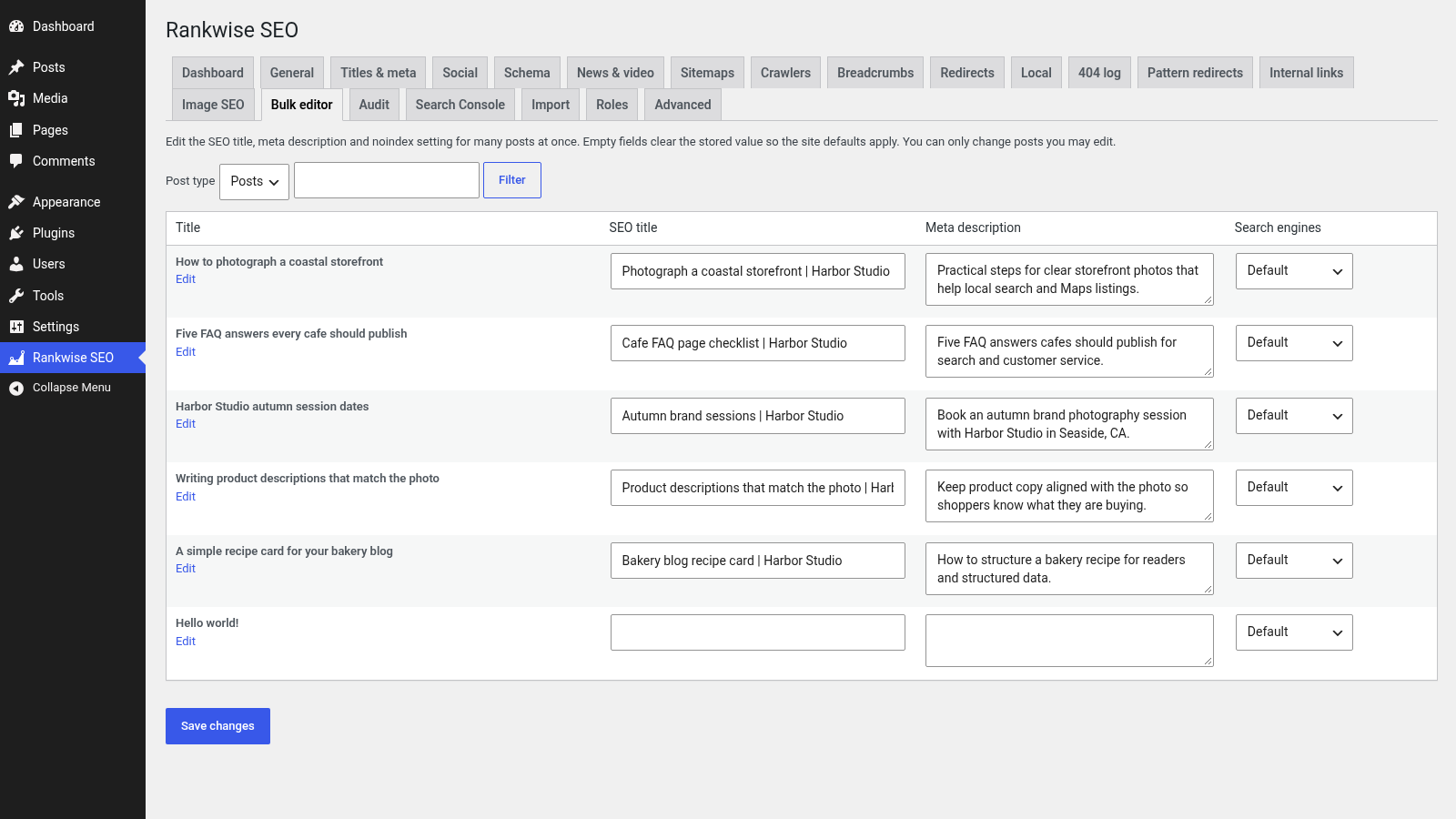
Edit SEO titles, descriptions and noindex across many posts. Assign SEO capabilities by role (administrators cannot be locked out).
WP-CLI: wp rankwise
Audit, redirects, 404 prune, settings export/import, sitemap flush and link reindex from the command line.
Up to five focus keywords, with synonyms
The main keyword plus four more, each with optional synonyms, checked against the title, description and text while you write.
Structured data types when the fields are filled
FAQ, how-to, product, local business, recipe, event and video — chosen per post. Markup is added only when required fields are complete.
Redirects and a private 404 log
Exact redirects with CSV, plus a 404 log that stores paths and referring hosts — never visitor IP addresses or user agents.
SEO audit you can run on your own site
Titles, descriptions, noindex, duplicates, thin content and a few site checks. One check fetches only your own front page.
Bulk editor, local SEO and image alt text
Edit many titles and descriptions at once, publish local business details, and fill missing alternative text from a list or a template.
Optional Google Search Console
Connect with an OAuth client you create in Google Cloud. Read-only access; tokens encrypted on your site. The demo shows the settings UI only — no live Google connection was made.
Details that keep SEO work practical
Readability checks, WooCommerce helpers when Woo is active, and a clear split between Suite and its sibling Toolkit edition.
Readability and focus keyword checks
English readability and focus-keyword presence in the block editor and the classic editor.
WooCommerce SEO when Woo is active
Product structured data with price and availability, noindex for cart/checkout/account, product category breadcrumbs and product images in the sitemap. WooCommerce was not installed in the demo screenshots.
Runs on your site
By default the plugin makes no requests to any outside service. Google Search Console is the only optional outbound path, and it is documented under External Services.
Sibling editions share data
Suite is a full edition on its own. Rankwise SEO Toolkit is a sibling edition that reads the same settings and SEO fields. Only one edition should be switched on at a time.
How it works
From install to a working SEO setup in four steps.
Install and open Rankwise SEO
Upload the plugin folder, switch it on, and open Rankwise SEO in the admin menu. The dashboard shows site status at a glance.
Set titles, schema and sitemaps
Choose title templates, organisation details, social cards and sitemap options. Edit robots.txt or llms.txt only if you need to.
Write with the SEO box
On each post, set the search title, description and focus keywords. Add FAQ, how-to or other structured data when the page really contains it.
Audit, redirects and extras
Run an SEO audit, add redirects or pattern rules, fill missing image alt text, and connect Search Console only if you want that optional data.
Made for real WordPress content sites
Use it wherever titles, structured data and redirects need to stay under your control.
Fully licensed version
Fully licensed version — use on your own sites. You get the complete Suite edition, with every feature described on this page.
Requirements
- WordPress 6.3 or newer (shown working on WordPress 7.1.2)
- PHP 7.4 or newer
- A single WordPress site (multisite is not supported)
- Optional Google Search Console needs the PHP sodium extension and your own Google OAuth client
- Optional WooCommerce SEO features appear when WooCommerce is active
Frequently asked questions
What licence do I get?
Each purchase is a fully licensed copy of the plugin for use on your own sites.
Is Suite a full edition, or does it need Toolkit?
Suite is a full edition. It includes the shared on-page tools plus the Suite extras listed on this page. Toolkit is a sibling edition that shares the same settings and SEO fields. Switch only one edition on at a time; if both are on, the second pauses itself and says so.
Does the plugin contact other sites?
By default, no. The only optional outbound path is Google Search Console, using an OAuth client you create, with read-only access. Tokens are encrypted on your site. Disconnecting revokes the token and deletes cached rows.
Which structured data types can I add?
FAQ, how-to, product, local business, recipe, event and video, chosen per post. Only describe what visitors can see on the page. Search engines decide for themselves whether to show rich results.
How are pattern redirects kept fast?
Patterns are limited to 200 characters and checked when you save them. Slow patterns are refused. While a page loads, pattern rules run only after exact redirects, with a short time budget and a cap on how many switched-on rules are used.
Where do internal link suggestions come from?
From an index of your published content stored in your own database. Password-protected and noindex posts are left out. Nothing is sent to any outside service.
Does automatic alternative text change the media library?
No. It is off by default. When switched on, empty alt text is filled from a template as the page is shown; nothing is saved, and alt text you wrote is never replaced.
Does it work on multisite?
No. Multisite is not supported.
Can I remove all data when I delete the plugin?
Nothing is removed unless you first tick Delete all data when the plugin is deleted. If Toolkit is still installed, data is kept so it continues to work.
Is it translation-ready?
Yes. Text is prepared for translation and a languages folder is included.
Who Rankwise SEO Suite is for
Rankwise SEO Suite is for WordPress site owners who want search titles, structured data, redirects and audits handled properly, without an annual SEO subscription and without a plugin that talks to outside services in the background.
- Small business and local sites that need clean search listings, LocalBusiness structured data and an address block, and nothing they will never use.
- Bloggers and content sites that have outgrown the basics and want five focus keywords with synonyms, FAQ and how-to schema, internal link suggestions and an SEO audit.
- Stores running WooCommerce that want product schema and WooCommerce SEO options in the same plugin as their redirects.
- Freelancers and developers who like a
wp rankwisecommand for audits, redirects and settings export. - Privacy-minded owners: no outbound requests by default, and a 404 log that never stores IP addresses or user agents.
Not a fit: WordPress multisite networks (not supported), or anyone who needs keyword rank tracking or AI writing tools inside WordPress. For an honest side-by-side, read Rank Math vs Rankwise.
Free Toolkit or Suite?
Start free if you only need the on-page basics. Rankwise SEO Toolkit includes title and description templates, the SEO box with search and social previews, canonical and robots controls, Open Graph and Twitter cards, core JSON-LD, sitemap and robots.txt settings, an optional llms.txt, breadcrumbs, exact redirects with CSV and an importer with undo. Suite shares the same settings and SEO fields, so upgrading later keeps all your work. Suite adds:
- Up to five focus keywords, each with synonyms.
- FAQ, how-to, product, local business, recipe, event and video schema, printed only when required fields are filled.
- A private 404 log, pattern (regex) redirects with a tester, and bulk changes to exact redirects.
- Internal link suggestions, image SEO (missing alt text list and an optional alt template), local SEO, news and video sitemaps.
- SEO audit with a Site Health test, a bulk editor, a role manager, optional read-only Google Search Console data and WP-CLI commands.
Getting started in 10 minutes
- Upload and activate the plugin. If you used another SEO plugin, run the importer and check the preview before you confirm.
- Set your title and description templates, then your organisation or person details.
- Deactivate your previous SEO plugin so only one set of tags is printed.
- Open your five most important pages and fill in the Rankwise SEO box.
- Run the SEO audit and fix the critical findings first.
Full walkthrough: how to set up SEO on a new WordPress site and how to add schema to WordPress without code.
More questions
Can I move from Rank Math, Yoast or another SEO plugin?
Yes. The importer brings titles, descriptions and other SEO fields across with a preview and an undo button, and the previous plugin’s data is left unchanged. Export redirects from your old plugin and import them with CSV.
Is this a subscription?
No. It is a one-time payment with lifetime access to future updates.
Will it slow my site down?
Rankwise does its work when pages are generated and makes no outside requests by default. Pattern redirects run only after exact redirects, with a short time budget, and the link index is kept in your own database.
Can my editors use it without touching settings?
Yes. The role manager assigns SEO capabilities by role, and since version 1.0.1 each user only sees the Rankwise tabs they are allowed to open.
Changelog
1.0.1
- The Rankwise SEO menu now appears for any user with at least one Rankwise capability.
- Each tab checks its own capability: redirects, the 404 log and pattern redirects need “Manage redirects and the 404 log”; the bulk editor needs “Edit SEO fields in bulk”; import and roles need an administrator.
- Users only see the tabs they can open, and redirect, 404, pattern and bulk-edit actions each check their own capability and security token.
1.0.0: first release.
Requirements: WordPress 6.3+, PHP 7.4+, single site. Current version: 1.0.1.
Search titles, schema and redirects — on your own site
Rankwise SEO Suite covers the on-page basics and the extras larger sites need. Fully licensed version — use on your own sites.
007AJ